
Back in 2020, Apple made a massive announcement: Intel would be kicked to the curb in favor of their own in-house designed processors known today as Apple Silicon. This same architecture had been used for years in many of their popular devices such as the iPhone and iPad, and as mobile processors became more powerful, the transition was inevitable.
Initial fears grew over workflow disruptions and legacy hardware support, though most would agree the transition went smoothly thanks to Developers quick work adapting their apps and drivers to keep the momentum moving, in addition to Apple still supporting legacy architecture and apps still lagging behind with Rosetta 2 acting as a seamless bridge. While many critics would agree the transition has led to improved performance and stability, Apple quietly added a hidden benefit for creatives in the production world they call the “Media Engine.”
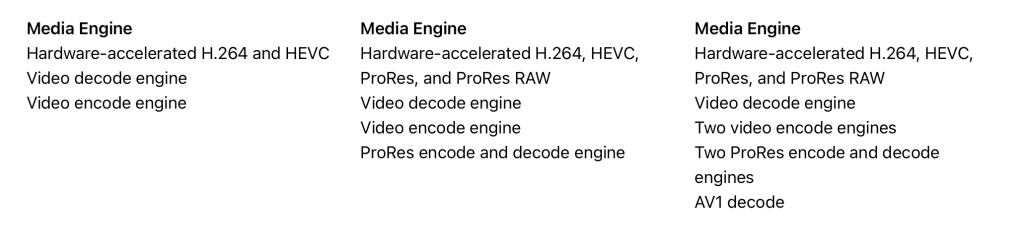
Media Engine capabilities for the M1, M2, and M5 Max
Source: Apple.com
The Media Engine has been included with each Apple Silicon chip including the original M1, and features allocated processing cores dedicated to popular production codes including h.264, h.265 (HEVC), and in newer chips ProRes RAW, and even AV1 support has been added. This engine helps the CPU and GPU by offloading the encoding, giving more headroom for multitasking and better overall performance. This can boost a large number of production workflows including editing, rendering, exporting, and live streaming video content in the supported formats. Many production apps natively utilize this feature, from Adobe’s Creative Cloud Premiere and After Effects, Final Cut Pro, DaVinci Resolve, and even Blender. However, just because they support the engine doesn’t mean it’s being used by default.
Is Your Mac Using the Media Engine?
Simply owning an Apple Silicon Mac doesn’t guarantee that your software is taking advantage of the Media Engine. Fortunately, a quick settings check in Premiere Pro, DaVinci Resolve, OBS, and Blender can confirm that hardware acceleration is enabled and working as intended.
Adobe Premiere Pro 2026

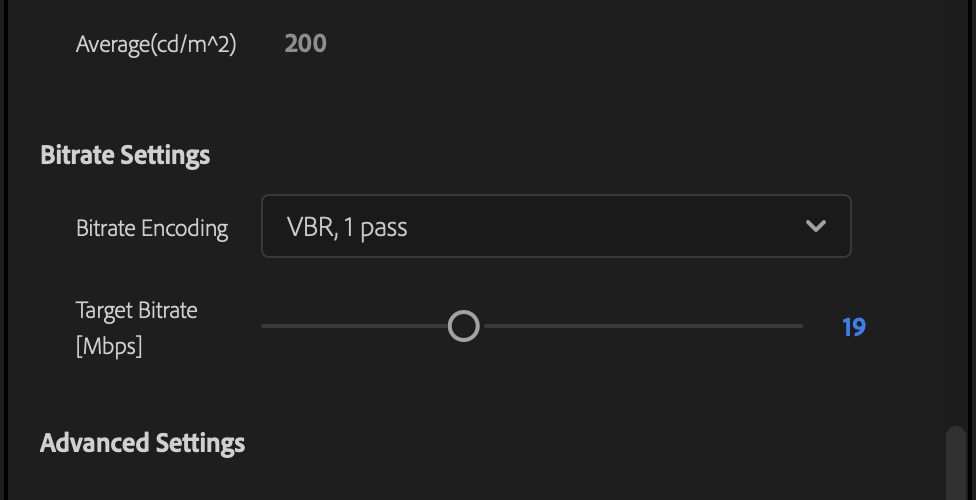
Enter the Export Window (⌘E), expand the ‘Video’ pane, scroll down and click …More. From here, check to make sure under Encoding Settings, Performance is set to Hardware Encoding. If Software Encoding is selected and you encounter an error saying acceleration isn’t available, scroll down and check your Bitrate Settings. Bitrate Encoding should be set to ‘VBR, 1 Pass’ (I’ve often found this as a setting I need to fix to get Hardware Encoding working again.)
BlackMagic DaVinci Resolve
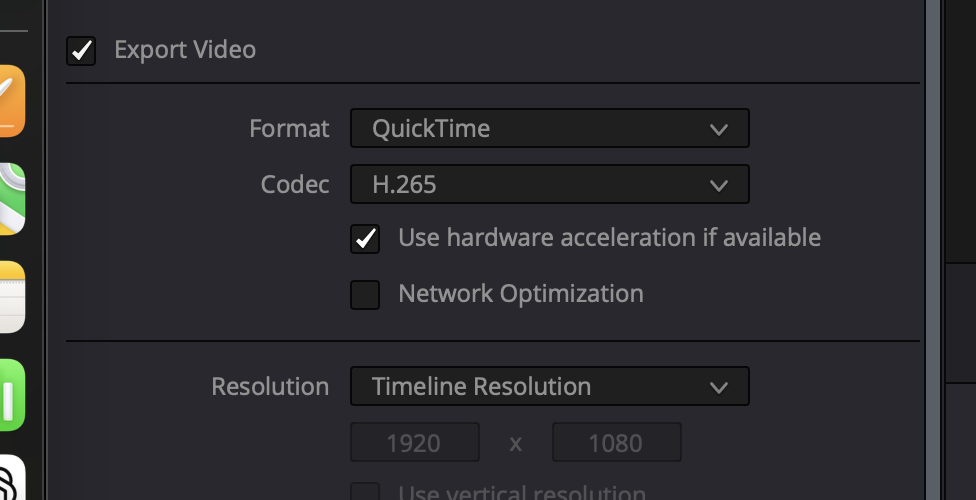
Resolve is very straight forward, and often utilizes the Media Engine automatically depending on the codec. However, there’s still an optional checkbox when exporting for certain codecs to ensure is checked. This doesn’t force Engine use like other software, but still makes it available.
Open Broadcaster Software (OBS)
OBS is a platform that can dramatically benefit from utilizing the Media Engine, and is not set to do so by default. Live streaming is very resource demanding, especially when broadcasting at high resolutions and/or bitrates. This puts a lot of strain on the CPU and GPU, so offloading any amount of encoding to a dedicated core goes a long way.
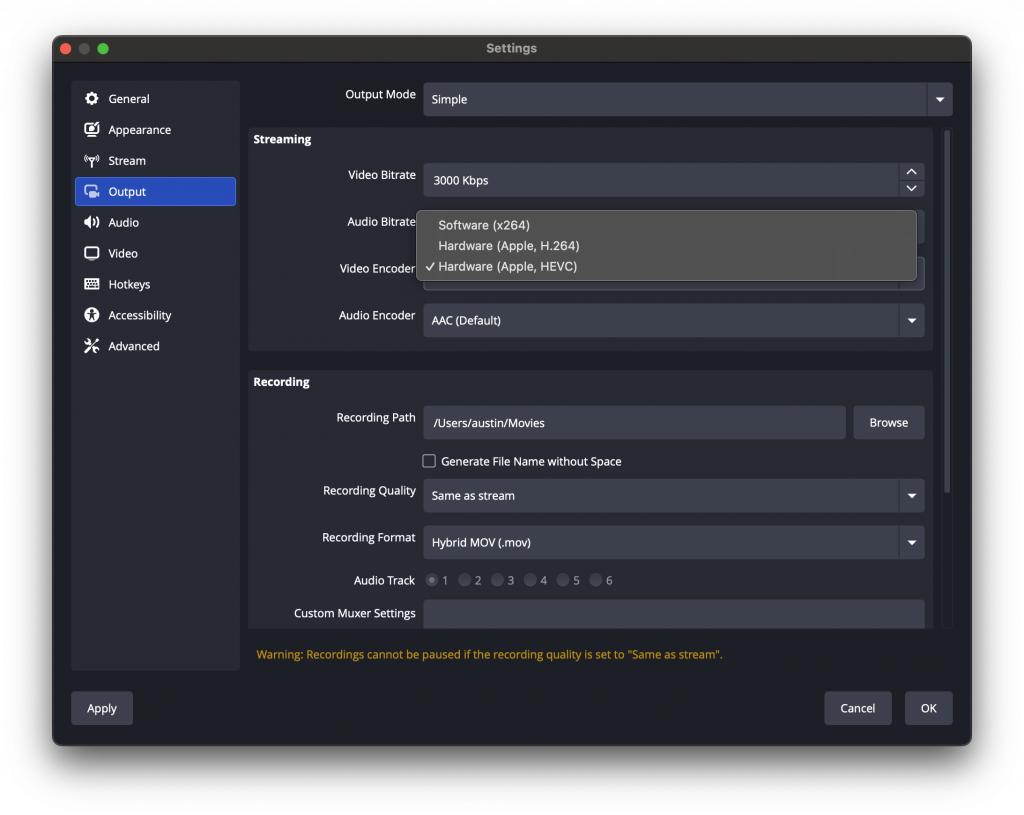
Under settings, go to the ‘Output’ tab, and find the Video Encoder option. Here you can chose from the available encoders on your Media Engine, most often h.264 and HEVC. Setting the Recording Quality to ‘Same as stream’ will also utilize the Media Engine to record to disk.
Blender
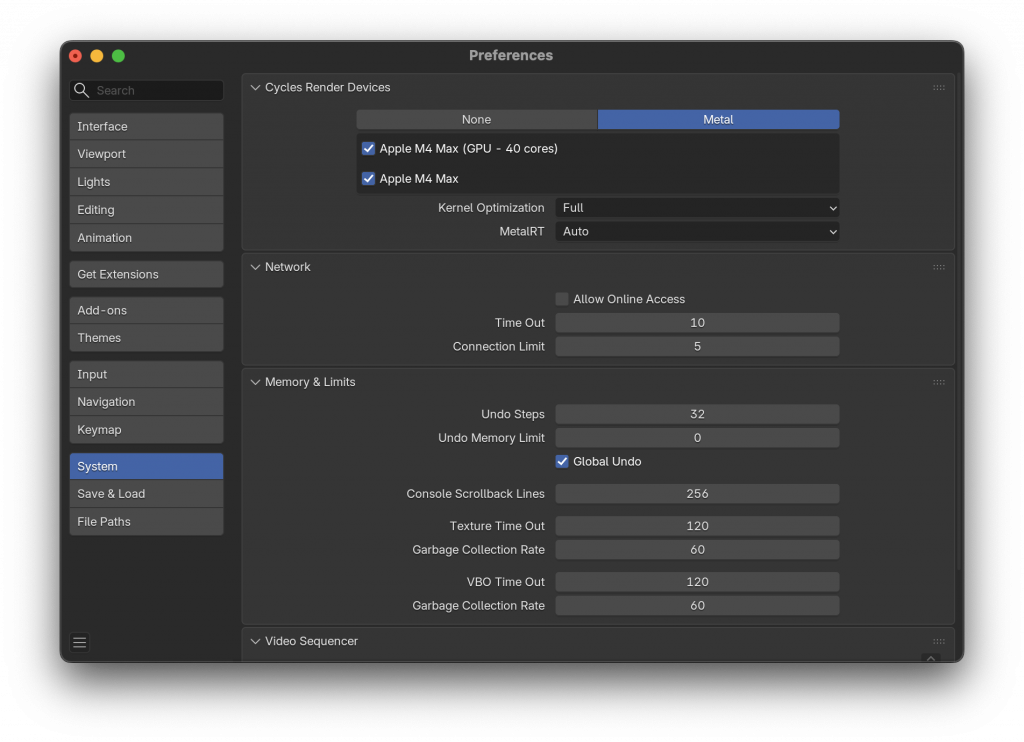
Blender tends to have the Media Engine utilized already, but only utilizes it fully when rendering in Cycles. To make sure you’re getting the best performance, head to Preferences (⌘,) and head to System. Make sure ‘Metal’ is selected, along with your chipset (which is often the only option, so hard to get it wrong 😊)
Hopefully these tips are helpful in utilizing the full potential of your Mac! Do you utilize the Media Engine for your production workflow? Have you noticed much of a difference? Always happy to talk shop: austin@deryckdx.com
✨AI was Utilized to Research, Verify Accuracy, and for Source Discovery.